🔁 The Event Loop: Keeping JavaScript Calm Under Pressure
Discover how the JavaScript Event Loop orchestrates async tasks like fetch, setTimeout, and UI events — keeping your apps responsive, fast, and smooth.
October 15, 2025
💥 Ever wondered how your browser seems to handle everything at once — fetching data, updating the UI, responding to clicks — all without freezing?
JavaScript is famously single-threaded, which means it can only do one thing at a time. So how does it manage to juggle multiple tasks so smoothly?
Behind the scenes, a quiet but powerful mechanism is making it all work: the Event Loop.
It doesn’t get much attention, but the Event Loop is the backbone of modern JavaScript. It’s what makes non-blocking behavior possible, keeps your app responsive, and helps scale web experiences without breaking under pressure.
🧠 Whether you're building a real-time dashboard, a chat app, or just trying to figure out why setTimeout doesn’t run instantly — understanding the Event Loop is key to mastering async in JavaScript. It’s the silent conductor that keeps the call stack, Web APIs, and callback queue in perfect sync.
Let’s break down how this humble piece of the JavaScript runtime keeps everything flowing. ⚙️
Let’s break it down in simple terms.
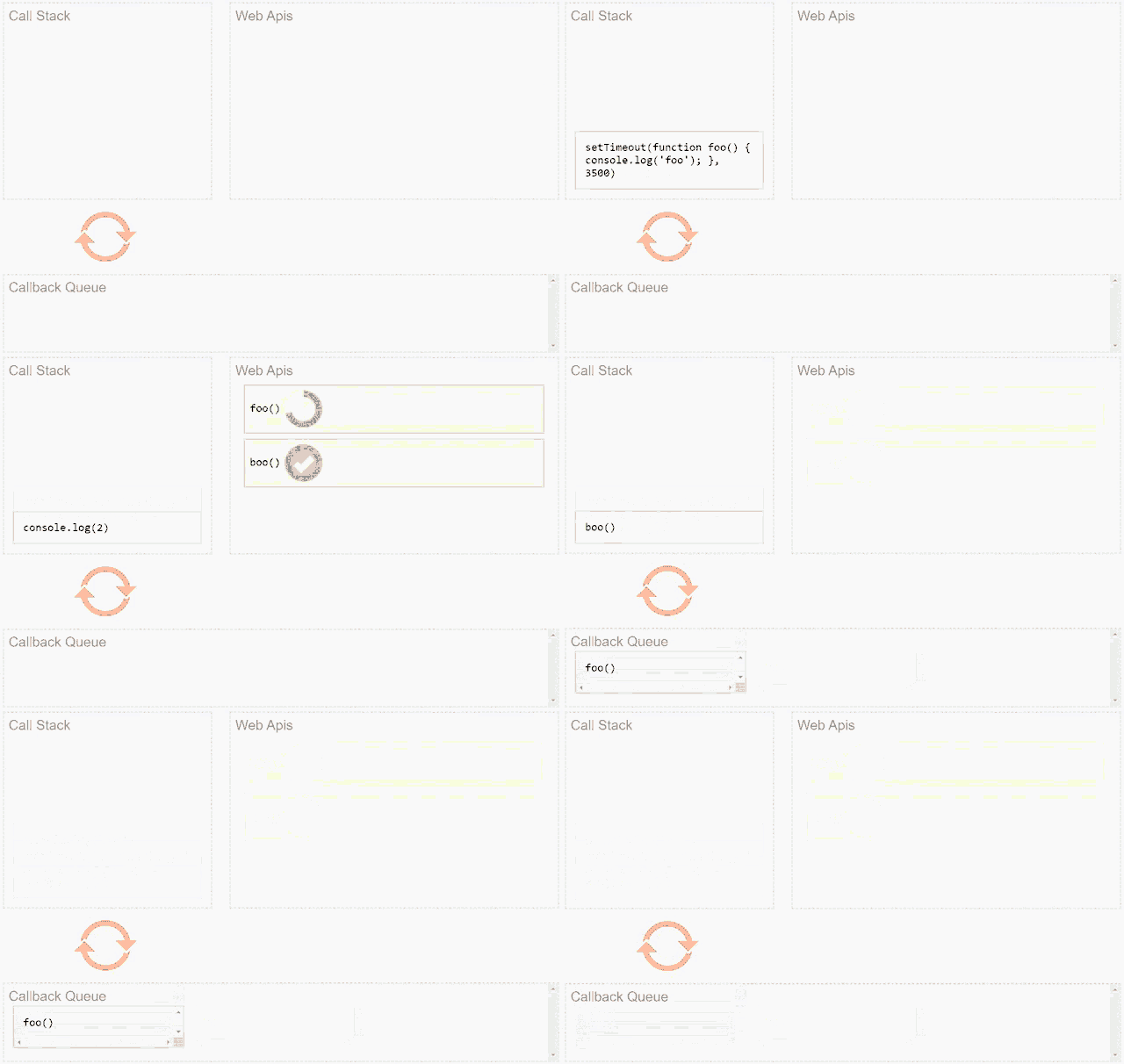
What comes to mind when I say, "What is JavaScript?"
You’ll probably say:
“It’s a single-threaded, synchronous language.”
But is it really that simple?
Let’s break it down and understand what that actually means.
🧠 JavaScript is Single-Threaded (But More Than That)
JavaScript being single-threaded means:
- It has one call stack
- It can only execute one task at a time
Imagine this like a shuttlecock tube 🏸:
You can only add or remove items from one end. That’s how a stack works.
🔍 A Simple Example
// This is the innermost function — it performs the actual task
function function1() {
  console.log(1); // Logs the number 1 to the console
}

// This is the middle function — it calls function1
function innerFunction1() {
  function1(); // Step 2: Calls function1
}

// This is the outermost function — it starts the entire chain
function mainFunction() {
  innerFunction1(); // Step 1: Calls innerFunction1
}

// This is where the program begins
mainFunction(); // Step 0: Starts the sequence
🧾 What Happens?
mainFunction()is added to the stack first — it's the entry point- Inside it,
innerFunction1()is called and added to the stack - Then
function1()is called insideinnerFunction1()and added to the stack console.log(1)runs and prints1- Functions are removed from the stack in reverse order:
function1()→innerFunction1()→mainFunction()
📦 Call Stack (Visual):
function1()
innerFunction1()
mainFunction()
This keeps adding the same function to the stack until it crashes. You’ll get a Maximum call stack size exceeded error.
🕰 So How Does JavaScript Handle Async Tasks?
If JavaScript runs one thing at a time, how does it handle:
- API calls (
fetch) - Timers (
setTimeout) - Event listeners (
click,scroll) - File access, database reads, etc.
That’s where the Event Loop comes in.
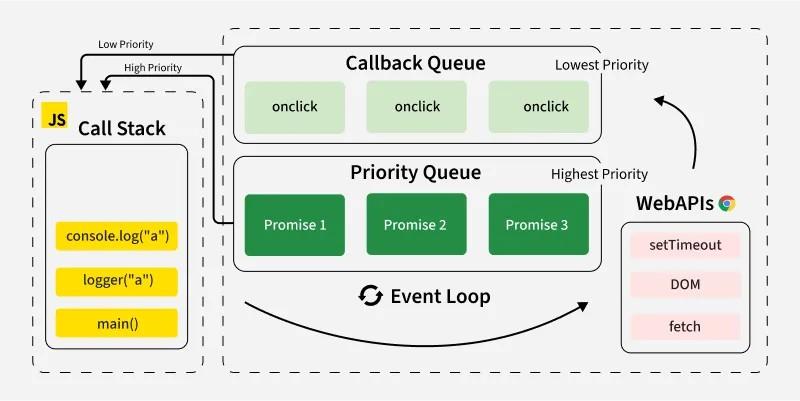
🔁 What Is the Event Loop?
JavaScript relies on an environment (like the browser or Node.js), which includes:
- Call Stack – Runs your code
- Web APIs – Handle async tasks like
setTimeout,fetch, etc. - Callback Queue – Stores callbacks when ready
- Event Loop – Watches the stack and queue
console.log("Start");

setTimeout(() => {
  console.log("Timeout callback");
}, 0);
console.log("End");
Output
Start
End
Timeout callback
Even though setTimeout is set to 0ms, it’s handled by the Web API, then added to the Callback Queue. The Event Loop waits until the Call Stack is empty before executing it.
🎡 How the Event Loop Works (Step by Step)
-
Code starts executing — goes into the call stack.
-
Async functions like
setTimeoutgo to Web APIs. -
After completion, their callback moves to the Callback Queue.
-
The Event Loop constantly checks:
“Is the call stack empty?”
-
If yes, it pulls the next task from the queue to the stack.
👀 Visualize the Event Loop
Want to see it in action?
Check out this fun and interactive tool:
🔗 Loupe – JavaScript Event Loop Visualizer
It’s a fantastic way to watch the stack, Web APIs, and event loop at work.
📌 TL;DR
✅ JavaScript runs in a single thread
✅ Only one thing at a time can be in the call stack
✅ Async tasks are handled via Web APIs
✅ Callbacks wait in the queue
✅ The Event Loop pushes them into the stack when it’s clear
🧠 Final Thoughts
The event loop is the beating heart of how JavaScript handles concurrency.
Once you understand this, you’ll have a much deeper grasp of how JS executes code, handles async tasks, and avoids blocking.
Next time someone says “JS is synchronous,” you’ll know what’s really happening under the hood.
📺 Want to Go Deeper?
If you want a brilliant visual explanation of the JavaScript Event Loop, check out this YouTube video by Philip Roberts:
👉 What the heck is the event loop anyway?
🎥 A massive shoutout to Philip for taking 18 months to research and break down the event loop in such a clear and simple way. His talk at JSConf is a must-watch for any JS developer!